

What Is My IP Address?
An IP address is one of the most important concepts in modern internet technology. Every device connected to the internet, including computers, smartphones, tablets, gaming consoles, and smart televisions, uses an IP address to communicate with other devices and online services. The term IP stands for Internet Protocol, which is the set of rules governing how data travels across networks and the internet. Without IP addresses, websites, apps, and online services would not know where to send information.
An IP address acts like a digital home address for devices connected to the internet. When someone visits a website, sends an email, streams a video, or downloads a file, their device exchanges information using IP addresses. These addresses help identify devices and route internet traffic correctly between servers and users worldwide. Understanding IP addresses is important not only for internet users but also for anyone interested in computers, cybersecurity, networking, or digital communication.
According to Cloudflare Learning Center, an IP address is a unique numerical label assigned to devices connected to networks using the Internet Protocol.
Understanding the Meaning of an IP Address
An IP address is a series of numbers used to identify devices connected to the internet or local networks. Similar to how houses have street addresses, computers and devices require digital addresses so data can reach the correct destination. Without IP addresses, internet communication would not function properly.
Whenever a device connects online, internet service providers assign IP addresses that allow communication with websites, servers, and applications. When someone types a website address into a browser, the browser contacts domain name system servers to translate the website name into an IP address. The device then communicates directly with the server hosting the website.
IP addresses also help websites and online services determine approximate geographic locations, internet providers, and network details. However, an IP address usually identifies a network connection rather than an exact individual person.
According to IBM Networking Guide, IP addresses enable devices to locate and communicate with one another through internet networks.
Types of IP Addresses
There are several types of IP addresses used in computer networking and internet communication. The two main internet protocol versions are IPv4 and IPv6. IPv4 is the older and most widely used format, while IPv6 was developed to solve address shortages caused by internet growth.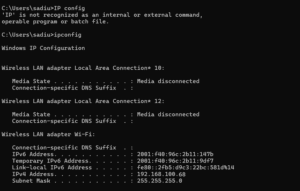
IPv4 addresses consist of four groups of numbers separated by periods, such as 192.168.1.1. Each group ranges from 0 to 255. IPv4 supports approximately 4.3 billion unique addresses, which initially seemed sufficient but became limited as internet-connected devices increased globally.
IPv6 uses a much longer hexadecimal format designed to support vastly more addresses. This newer system allows nearly unlimited address availability for future internet expansion. Many modern networks now support both IPv4 and IPv6 simultaneously.
IP addresses can also be categorized as public or private. Public IP addresses are visible on the internet and assigned by internet service providers. Private IP addresses are used within local networks such as homes, offices, or schools. Routers manage private network communication internally while using public IP addresses to connect externally.
Dynamic IP addresses change periodically and are commonly assigned automatically by internet providers. Static IP addresses remain fixed and are often used for servers, websites, and business systems requiring consistent network access.
How IP Addresses Work
IP addresses function through networking protocols that direct data across the internet. Every online action involves data packets traveling between devices and servers. These packets contain source and destination IP addresses so networks know where to send information.
When users visit websites, their devices send requests to web servers hosting the site. The request includes the user’s IP address, allowing the server to return the requested webpage data correctly. Routers and networking equipment analyze IP information continuously to forward data efficiently across global internet infrastructure.
The internet itself consists of interconnected networks managed by internet providers, companies, governments, and organizations. IP protocols standardize communication across these systems, enabling devices worldwide to exchange information reliably.
Routing systems use IP addresses similarly to postal systems. If someone mails a package, postal workers rely on addresses to deliver it correctly. Likewise, internet routers rely on IP addresses to deliver data packets between devices and servers.
According to Cisco Networking Basics, IP addresses allow devices to communicate across networks by identifying the sending and receiving systems.
Methods to Find Your IP Address
There are several methods users can use to discover their IP address. One of the easiest methods involves using online IP checker websites that automatically display public IP addresses when users visit the page. These websites identify the network connection visible to the internet.
Operating systems also provide built-in tools for checking IP information. On Windows computers, users can open Command Prompt and type “ipconfig” to display local network details. On macOS and Linux systems, terminal commands such as “ifconfig” or “ip addr” show networking information.
Mobile devices also include network settings displaying Wi-Fi and IP details. Routers often provide administrative panels where users can view connected devices and network configurations.
Public IP addresses identify internet-facing connections, while private IP addresses identify devices inside local networks. Many home networks use routers that assign private addresses internally while sharing a single public IP address externally.
Online tools such as WhatIsMyIP.com and IPLocation.net allow users to check public IP information, approximate location, and network provider details.
Why IP Addresses Matter
IP addresses are essential because they make internet communication possible. Without addressing systems, websites, streaming platforms, online games, email systems, and cloud services could not function properly.
Businesses use IP addresses for website hosting, remote access, cybersecurity monitoring, and server management. Streaming services use IP information for content licensing and regional restrictions. Online advertisers use IP-based location data to deliver localized advertisements and search results.
IP addresses also play major roles in cybersecurity. Network administrators monitor IP traffic to detect suspicious activities, prevent attacks, and manage internet access. Firewalls and security systems rely heavily on IP filtering and monitoring techniques.
For average users, understanding IP addresses helps improve digital literacy, troubleshoot internet issues, configure routers, and strengthen online privacy awareness.
Understanding Basic PC Components
To understand internet networking and IP addresses fully, it is helpful to learn some basic computer concepts. A personal computer, commonly called a PC, consists of hardware and software working together to process information and connect users to digital services.
The central processing unit, or CPU, acts as the brain of the computer. It performs calculations, executes instructions, and manages system operations. Faster processors improve performance in gaming, editing, programming, and multitasking tasks.
Random access memory, known as RAM, temporarily stores data currently in use by the computer. More RAM allows smoother multitasking and faster application performance. Storage devices such as hard drives and solid-state drives permanently store operating systems, files, applications, and media content.
The motherboard connects all computer components together. It allows communication between the CPU, memory, storage devices, and expansion hardware. Graphics processing units, or GPUs, handle visual rendering for gaming, video editing, and graphic-intensive tasks.
Input devices such as keyboards and mice allow users to interact with computers, while output devices like monitors and speakers display information and audio.
According to HP Computer Basics Guide, modern computers combine processing, memory, storage, and networking components to perform digital operations efficiently.
Operating Systems and Computer Software
An operating system is the core software controlling computer hardware and applications. Popular operating systems include Microsoft Windows, macOS, and Linux.
Operating systems manage files, memory, hardware communication, networking, and user interfaces. They provide platforms where applications such as browsers, games, office tools, and media software can operate.
Software can generally be divided into system software and application software. System software includes operating systems, drivers, and utilities required for computer functionality. Application software includes programs designed for user tasks such as writing documents, browsing websites, editing photos, or playing games.
Modern operating systems also include networking features allowing computers to connect to the internet, manage Wi-Fi, configure IP settings, and communicate with cloud services.
Internet Connections and Networking Basics
Internet connectivity relies on networking technologies connecting devices globally. Home users typically access the internet through internet service providers using fiber optic, cable, DSL, satellite, or mobile networks.
Routers distribute internet connections between devices within homes or offices. They assign private IP addresses internally while communicating externally using public IP addresses provided by internet providers. Modems connect local networks to broader internet infrastructure.
Wi-Fi technology enables wireless communication between devices and routers. Ethernet cables provide wired networking connections often preferred for stability and speed. Networking equipment manages data transmission efficiently across connected systems.
Network speed depends on bandwidth, hardware quality, provider infrastructure, and signal strength. Faster internet improves streaming, gaming, AI tools working, downloading, and video conferencing experiences.
According to Intel Networking Basics, networking technology enables devices to exchange data through wired and wireless communication systems.
DNS and How Websites Load
The Domain Name System, commonly called DNS, acts like the internet’s phonebook. Humans prefer readable website names such as google.com or openai.com, but computers communicate using IP addresses. DNS translates domain names into IP addresses so browsers can locate servers hosting websites.
When users type website addresses into browsers, DNS servers search databases to find corresponding IP addresses. The browser then connects to the correct web server and loads the requested content.
Without DNS systems, users would need to remember numerical IP addresses for every website. DNS greatly simplifies internet navigation and accessibility.
Large companies operate global DNS infrastructures to improve speed, reliability, and cybersecurity for billions of internet users daily.
Cybersecurity and Online Privacy
Understanding IP addresses also helps users learn about online privacy and cybersecurity. Every internet connection leaves digital traces that websites and services can analyze. While IP addresses alone usually do not reveal exact personal identities, they may indicate approximate locations and internet providers.
Hackers sometimes target IP addresses during cyberattacks such as Distributed Denial-of-Service attacks. Cybersecurity systems protect networks by monitoring suspicious traffic and blocking malicious activity.
Virtual Private Networks, commonly known as VPNs, help improve privacy by routing internet traffic through encrypted servers. VPNs mask users’ public IP addresses and provide additional security on public networks.
Strong passwords, updated software, antivirus programs, and safe browsing habits also help protect devices from malware and cyber threats.
According to Kaspersky Cybersecurity Guide, IP addresses are important for internet communication but should also be protected through proper security practices.
Cloud Computing and Modern PCs
Modern computers increasingly rely on cloud computing services. Cloud computing allows users to store files, run applications, and access services through internet-connected servers instead of relying entirely on local hardware.
Services such as cloud storage, streaming platforms, remote collaboration tools, and online gaming all depend heavily on networking infrastructure and IP communication. Cloud providers operate massive data centers containing thousands of servers managing digital services globally.
Cloud computing improves scalability, accessibility, and collaboration while reducing hardware limitations for many users and businesses.
Gaming, Streaming, and Internet Performance
Gaming and streaming are major activities influenced by networking and IP systems. Online multiplayer games require stable low-latency connections to communicate rapidly between players and servers. Streaming services deliver video content continuously using internet protocols and content delivery networks.
Internet speed, ping, packet loss, and router quality all affect online experiences. Gamers often optimize networking settings to improve performance and reduce lag. Streaming platforms use adaptive technologies that adjust video quality according to internet bandwidth.
IP addresses also allow gaming servers and communication systems to connect users across regions worldwide.
Future of Internet Networking and IP Technology
The future of internet networking continues evolving rapidly. The expansion of connected devices through the Internet of Things increases demand for scalable addressing systems like IPv6. Smart homes, autonomous vehicles, wearable devices, and industrial systems all require reliable networking infrastructure.
Faster internet technologies such as 5G and fiber optics continue improving global connectivity. Cloud computing, artificial intelligence, and edge computing are transforming how data is processed and delivered across networks.
Cybersecurity and privacy concerns will remain important as internet dependence grows worldwide. Future networking systems will likely focus heavily on speed, efficiency, automation, and digital protection.
According to Internet Society IPv6 Guide, IPv6 is critical for supporting future internet growth and expanding connected device ecosystems.
Conclusion
IP addresses are fundamental components of internet communication and modern networking systems. They identify devices, route data, and enable websites, apps, streaming platforms, and online services to function correctly. Understanding how IP addresses work helps users improve digital literacy and internet awareness.
Learning basic PC concepts such as processors, memory, storage, operating systems, and networking also provides valuable knowledge for navigating today’s technology-driven world. Computers and internet systems rely on complex yet highly organized infrastructures connecting billions of devices globally.
As technology continues evolving, networking, cloud computing, cybersecurity, and internet infrastructure will become even more important. Understanding these foundational concepts helps users make informed decisions, improve online safety, and develop stronger technical knowledge in the digital age.
Author

Related posts

How Do I Find Reliable Wholesale Suppliers
- 0
- 9,103 words
How Do I Find Reliable Wholesale Suppliers ? Finding reliable wholesale suppliers is one of the most important tasks for anyone starting...
Read out all
What Is Happening in the World?
- 0
- 5,355 words
What Is Happening in the World? The world is currently experiencing a period of overlapping crises and opportunities. Political disputes, military conflicts,...
Read out all
BRICS
- 0
- 5,794 words
BRICS : History, Members, Economy, Goals, Expansion and Global Influence BRICS is an international grouping of major emerging economies and developing countries...
Read out all
United Kingdom
- 0
- 5,089 words
United Kingdom The United Kingdom, commonly known as the UK, is one of Europe’s most fascinating travel destinations. Officially called the United...
Read out all
Bhutan
- 0
- 4,154 words
Bhutan Travel Guide Bhutan is one of the most fascinating travel destinations in Asia, offering an extraordinary combination of Himalayan landscapes, Buddhist...
Read out all
What Are the Best Places to Visit in Europe
- 0
- 5,498 words
What Are the Best Places to Visit in Europe ? Europe is one of the most fascinating travel destinations in the world,...
Read out all